
When a customer taps a card, enters payment details online, or pays an invoice link, the transaction may look complete within seconds. The screen says approved, the receipt prints, and the customer walks away.
But behind that simple payment approval is a longer transaction lifecycle involving authorization, capture, batch processing, clearing and settlement, and merchant funding.
That is why understanding payment authorization vs settlement matters for any business that accepts card payments. Authorization confirms whether a transaction can proceed. Settlement finalizes the transaction and moves funds through the payment system so the merchant can receive a deposit.
This distinction affects cash flow, bookkeeping, refunds, customer service, and reconciliation. A transaction can be authorized but not yet captured. It can be captured but not yet settled. It can be settled but funded later as a net deposit after fees, refunds, reserves, or chargebacks.
For business owners, ecommerce sellers, restaurants, service providers, finance teams, and bookkeepers, the goal is not to memorize every technical detail. The goal is to understand what each stage means, what can delay funds, why deposits may not match gross sales, and how to manage payment reports with confidence.
What Does Payment Authorization vs Settlement Mean?
Payment authorization vs settlement describes two separate but connected stages in credit card processing. Authorization is the approval stage. Settlement is the finalization and fund movement stage. Both are required in most card transactions, but they do not happen at the same moment.
During payment authorization, the merchant asks whether the cardholder’s account can support the transaction. The request moves from the merchant’s POS system, payment gateway, or payment processor through the card network to the issuing bank.
The issuer checks factors such as available funds or credit, account status, card validity, risk signals, and sometimes security data such as CVV or address verification information.
If the issuer approves the transaction, the merchant receives an authorization response. That response usually includes an approval code. At this point, the customer may see a pending transaction or authorization hold, but the merchant has not necessarily received the money.
Payment settlement comes later. Settlement happens after the transaction is captured and included in a batch. During clearing and settlement, transaction records are exchanged, fees and adjustments are applied, and funds move between financial institutions.
Merchant funding is the final step from the business perspective, when the net deposit reaches the merchant’s bank account.
What Is Payment Authorization?

Payment authorization is the process of asking the issuing bank whether a card transaction should be approved or declined. It happens when a customer presents a card in person, enters card data online, pays through a mobile wallet, clicks a payment link, or is billed through a stored payment method.
The payment authorization process begins with the merchant’s payment interface. That interface may be a POS terminal, card reader, ecommerce checkout, invoice payment page, virtual terminal, mobile app, or recurring billing system. The system collects the transaction amount and securely sends the payment details for review.
An authorization request may include the transaction amount, card number or token, expiration date, merchant information, transaction type, device data, billing address, CVV result, and other risk signals. The payment processor and card network route this request to the issuing bank.
The issuing bank then decides whether to approve or decline. The issuer may check whether the card is active, whether the account has enough available funds or credit, whether the transaction looks unusual, whether the cardholder has spending limits, and whether the account has restrictions.
If approved, the issuer places an authorization hold or reduces available credit. If declined, the merchant receives a declined transaction response. In many cases, the merchant sees a general decline reason, not the full issuer decision logic.
Card authorization works differently by channel. Card-present transactions often use EMV chip or contactless data. Card-not-present transactions, including ecommerce payments and invoice payments, rely more heavily on billing details, CVV, fraud screening, tokenization, and gateway rules. Recurring billing often uses stored tokens and scheduled authorization attempts.
What Is Payment Settlement?
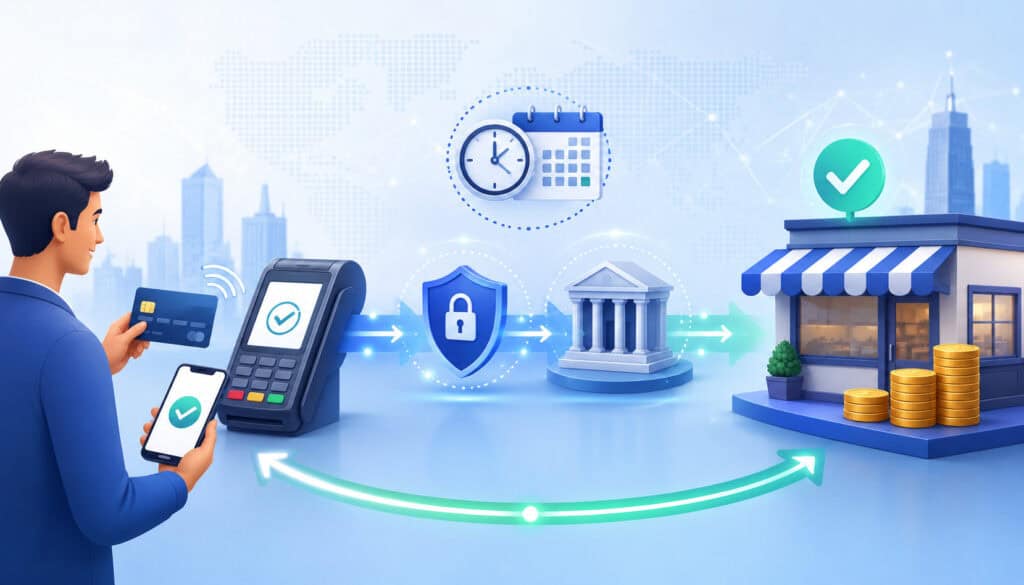
Payment settlement is the process that finalizes approved and captured card transactions so funds can move through the payment system. If authorization asks, “Can this transaction proceed?” settlement answers, “How is this transaction finalized, cleared, and funded?”
Before settlement can happen, the merchant usually must capture the transaction. Payment capture, sometimes called transaction capture, tells the payment processor that the merchant wants to submit the approved transaction for settlement.
Many retail and restaurant POS payments are captured automatically. Ecommerce orders may use automatic capture or delayed capture, depending on whether the business ships immediately or later.
After capture, transactions are grouped into a batch. Batch processing allows many transactions from a business day to be submitted together instead of settled one by one. Some systems close batches automatically at a scheduled time, while others require a manual batch close.
Once the batch is submitted, clearing and settlement begin. Clearing is the exchange and validation of transaction details between parties. Settlement is the movement of funds between the issuing bank, acquiring bank, and related payment system participants. Merchant funding happens when the merchant receives a net deposit into its bank account.
The funded amount may be lower than gross sales. Common reasons include processing fees, refunds, chargeback deductions, reserves, adjustments, batch timing differences, and transactions that were authorized but not captured.
Settlement reports and batch reports help explain these differences. A good reconciliation process compares POS reports, gateway reports, batch totals, settlement report data, refunds, chargebacks, and actual bank deposits.
Payment Authorization vs Settlement: The Main Difference
The main difference between payment authorization and settlement is timing and purpose. Payment authorization checks whether a transaction can be approved. Payment settlement finalizes the transaction and supports the movement of funds.
In payment authorization vs settlement, authorization happens near the moment of purchase. The customer taps, swipes, inserts, enters, or submits payment details. The issuing bank reviews the request and sends back an authorization response. This response may approve or decline the transaction.
Settlement happens after the merchant captures the transaction and submits it for processing. This may occur automatically, at the end of the day, after order fulfillment, or after a manual batch close. Settlement depends on the processor, acquiring bank, card network, issuing bank, batch cutoff time, and risk controls.
A simple example helps. A customer buys a pair of shoes online. The payment authorization confirms the card can be charged. The ecommerce system captures the payment when the order is accepted or shipped. The transaction enters a settlement batch. Later, the merchant receives a net deposit.
Authorization is about permission. Settlement is about completion. Funding is about the merchant receiving the money.
This distinction matters because a merchant may see an approved sale in the POS or gateway but not see the deposit immediately. Approval does not eliminate settlement timing, funding schedules, fees, risk reviews, or adjustments.
Authorization vs Settlement Comparison Table
The following table summarizes authorization vs settlement in a practical way.
| Payment Stage | What It Means | Main Parties Involved | Business Impact | Common Issue to Watch |
| Payment authorization | The issuer reviews the transaction and approves or declines it | Cardholder, merchant, payment gateway, payment processor, card network, issuing bank | Confirms whether the sale can proceed | Approved transactions may still be pending, not funded |
| Authorization response | The merchant receives the issuer’s decision | Issuing bank, card network, processor, gateway, POS | Tells the business whether to complete the sale | Decline codes may be general or unclear |
| Authorization hold | Funds or credit are temporarily reserved | Issuing bank, cardholder, merchant | Customer may see a pending transaction | Holds may remain if a transaction is not captured or reversed properly |
| Payment capture | The merchant submits an approved transaction for settlement | Merchant, gateway, processor | Moves the transaction from approval to settlement submission | Delayed or missed capture can delay or prevent funding |
| Batch processing | Captured transactions are grouped for submission | Merchant, POS, gateway, processor | Determines when transactions enter settlement | Late batch close can delay deposits |
| Clearing and settlement | Transaction records are exchanged and funds move between institutions | Card network, acquiring bank, issuing bank, processor | Finalizes card settlement | Fees, adjustments, and timing rules affect totals |
| Merchant funding | Net funds are deposited to the merchant | Acquiring bank, processor, merchant account, merchant bank account | Affects cash flow and bookkeeping | Deposit may differ from gross sales |
Key Parties Involved in Authorization and Settlement
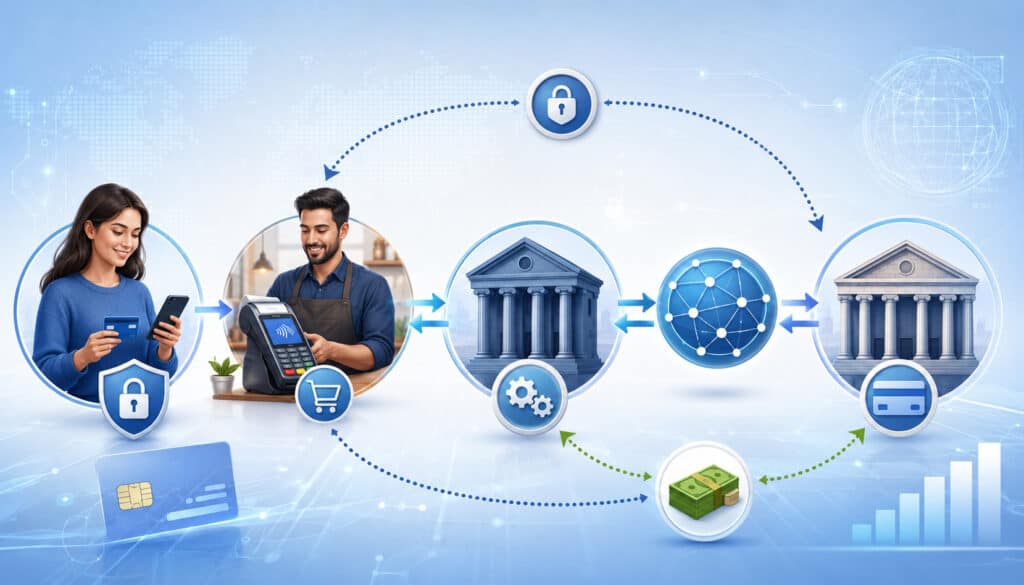
Card payments involve several parties working together. The customer sees only the checkout screen or terminal. The merchant sees an approval, decline, batch, or deposit. Behind the scenes, multiple systems route data and funds.
The cardholder is the customer using a credit card, debit card, prepaid card, mobile wallet, or stored payment method. The merchant is the business accepting payment. The payment interface is the point where the transaction begins, such as a POS terminal, ecommerce checkout, invoice link, or virtual terminal.
The payment gateway securely transmits payment data, especially for online payments and card-not-present transactions. The payment processor routes transaction data between the merchant, acquiring bank, card network, and issuing bank.
The acquiring bank supports the merchant’s ability to accept card payments and receive settlement. The issuing bank provides the cardholder’s card account and approves or declines transactions.
The card network connects the acquiring and issuing sides. It helps route authorization messages, supports clearing and settlement, and sets operating rules. The merchant account is the account relationship that allows a business to process and settle card transactions.
For more background on the technical and financial roles involved, businesses can review this guide on how a payment gateway differs from a merchant account.
Customer, Merchant, and Payment Interface
The payment starts when the customer chooses how to pay. In a retail store, that may mean inserting an EMV chip card, tapping a contactless card, using a mobile wallet, or swiping when fallback is allowed.
In a restaurant, the payment may include an initial authorization followed by a tip adjustment before settlement. In an ecommerce checkout, the customer enters card data or uses a saved payment method.
The merchant’s payment interface collects the transaction details and sends them securely. This interface may be a countertop terminal, mobile reader, POS system, ecommerce payment page, invoice link, virtual terminal, or recurring billing platform.
The payment interface should protect sensitive data. Businesses should use secure tools, avoid writing down card data, and limit staff access to payment systems. Secure payment collection supports payment security, PCI compliance, and customer trust.
For businesses learning the full online flow, this resource on how online payment processing works provides helpful context.
Gateway, Processor, Banks, and Card Networks
After the merchant submits the payment, the payment gateway and payment processor route the authorization request. The gateway often handles secure data transmission, checkout integration, fraud screening, tokenization, and transaction messaging. The processor manages routing to the acquiring side, card network, and issuing side.
The acquiring bank is connected to the merchant account. It supports the merchant’s ability to accept card payments and receive funds after settlement. The issuing bank is connected to the cardholder and decides whether to approve or decline the authorization request.
The card network connects the two sides. It helps move authorization messages, clearing files, settlement information, and operating rules between participants. In some transactions, different networks and routing options may apply depending on card type and transaction method.
These parties also matter after authorization. They help handle payment capture, batch processing, clearing and settlement, refunds, reversals, and chargebacks.
How the Payment Authorization Process Works
The payment authorization process usually happens in seconds, but it includes several coordinated steps. First, the customer presents payment details. The merchant’s payment system collects the amount, card data or token, merchant information, and transaction type.
Second, the merchant system creates an authorization request. This request is securely transmitted through the payment gateway or processor. For ecommerce payments, the request may include additional fraud screening details such as billing address, shipping address, device information, IP signals, and customer account history.
Third, the request is routed through the card network to the issuing bank. The issuer reviews the cardholder account. It checks whether the account is open, whether the card is valid, whether funds or credit are available, whether the transaction fits risk rules, and whether security data appears correct.
Fourth, the issuer sends an authorization response. The response may approve the transaction, decline it, or request additional authentication in certain online contexts. If approved, the merchant can proceed. If declined, the customer may need to use another payment method or contact the issuer.
Fifth, the merchant system records the result. For approved transactions, the authorization may be captured immediately or later. For declined transactions, the merchant should avoid repeated blind retries, especially when the decline appears permanent.
Businesses that want a deeper breakdown can read this guide on how payment authorization works.
What Happens During an Authorization Request?
An authorization request is a data message sent for issuer review. The exact fields vary by payment method, processor, gateway, and transaction type, but the goal is the same: give the issuer enough information to make a reliable approval or decline decision.
A typical authorization request may include the transaction amount, card number or token, expiration date, merchant name, merchant category, terminal or device information, transaction location, and whether the transaction is card-present or card-not-present.
For online payments, the request may also include billing address, shipping address, CVV result, AVS result, ecommerce indicator, device data, fraud score, wallet token data, stored credential information, and whether the transaction is part of recurring billing.
Accurate information matters. A wrong billing address, expired card, missing CVV, unusual shipping pattern, or incomplete transaction data can increase the chance of a declined transaction or fraud review. Strong data quality can also make reconciliation easier later because reports contain cleaner transaction details.
Why Transactions Are Approved or Declined
A payment approval means the issuing bank allowed the transaction at that moment. A declined transaction means the issuer, gateway, processor, or risk system did not allow it to proceed. The reason may be financial, technical, security-related, or account-related.
Common approval factors include available credit or funds, a valid card, correct card details, normal account activity, successful security checks, and transaction data that matches issuer expectations. For card-present transactions, EMV chip and contactless data can help confirm that the physical card or wallet was present.
Common decline reasons include insufficient funds, expired card, incorrect card number, wrong expiration date, CVV mismatch, AVS mismatch, suspected fraud, lost or stolen card status, issuer restrictions, spending limits, duplicate transaction concerns, inactive account, or technical communication errors.
Decline messages can be frustrating because they may not explain the full reason. Issuers often protect cardholder privacy and fraud controls by returning limited response codes. A merchant may see “do not honor” or “generic decline” even though the issuer made a more specific internal decision.
Businesses should train staff to handle declines calmly. The best response is usually to ask the customer for another payment method or suggest they contact their card issuer. Repeated retries can create duplicate holds or additional declines.
What Is an Authorization Hold?
An authorization hold is a temporary hold placed on available funds or credit after a transaction is approved. The hold helps ensure the cardholder has enough available balance for the transaction before settlement occurs.
Customers often see these holds as pending transactions. A pending transaction is not always the final charge. It may drop off, settle for the same amount, or settle for a different amount in certain industries.
Authorization holds are common in lodging, rentals, fuel, restaurants, delivery, and service businesses. A lodging business may authorize a card for the estimated stay plus incidentals. A fuel pump may authorize before the final fuel amount is known. A restaurant may authorize the check amount, then capture the final total after the tip is added.
The final settled amount can differ from the authorized amount when the business is allowed to adjust the transaction. However, businesses should follow applicable network rules, processor settings, and customer disclosure practices.
Authorization holds can confuse customers. They may believe they were charged twice when they see both a pending authorization and a settled charge. In most cases, the pending hold drops after the final transaction posts, but timing depends on the issuer and transaction handling.
Authorization vs Capture: Why Capture Matters
Authorization and capture are closely related, but they are not the same. Authorization approves the transaction. Capture submits the approved transaction for settlement. Without capture, an authorized payment may not result in merchant funding.
Many POS payments use automatic capture. A customer pays in person, the transaction is authorized, and the system captures it for the next batch. This is common in retail environments where the sale is completed immediately.
Ecommerce payments may use automatic capture or delayed capture. Automatic capture is common when the order is ready to fulfill. Delayed capture is useful when the business authorizes the card first and captures later, such as after confirming inventory or shipping.
Partial capture may apply when only part of an order is fulfilled. For example, if a customer orders several items and one is unavailable, the business may capture only the amount for items shipped. Uncaptured authorizations may expire or need to be reversed, depending on system settings and network rules.
Capture timing affects settlement timing. A transaction authorized but not captured before the batch close may miss the settlement cycle. A transaction authorized but never captured may never fund.
Businesses should understand whether their payment system captures automatically, manually, after fulfillment, after invoice approval, or on a recurring schedule.
How the Payment Settlement Process Works
The payment settlement process begins after capture. Captured transactions are collected in a batch and submitted to the processor. From there, transaction details move through clearing and settlement so funds can be transferred between the issuing and acquiring sides.
The processor prepares transaction records for clearing. Clearing validates and exchanges transaction details, including amounts, merchant data, authorization information, card data references, and applicable fees. The card network plays a central role in routing and coordinating these records.
Settlement is the financial movement connected to those cleared transactions. The issuing bank is responsible for the cardholder side, while the acquiring bank is responsible for the merchant side. The card network helps calculate obligations between participants according to its rules.
After settlement between financial institutions, merchant funding occurs. The merchant receives a deposit, usually net of processing fees, refunds, chargebacks, reserves, and other adjustments depending on pricing and funding setup.
For businesses, the most visible pieces are the batch report, settlement report, and bank deposit. The batch report shows what was submitted. The settlement report shows what was processed for settlement. The bank deposit shows what actually reached the business account.
A practical guide to batch processing for merchants can help businesses understand how batch timing affects settlement and funding.
Batch Processing and End-of-Day Settlement
Batch processing is the practice of grouping captured transactions and submitting them together. Instead of every transaction settling individually the moment it is approved, many businesses submit a batch at a cutoff time.
A batch may close automatically or manually. Automatic batch close is common in modern POS systems and gateways. Manual batch close may still exist in some environments, especially where staff need to review tips, adjustments, or end-of-day totals.
End-of-day settlement usually refers to the process of closing the batch after the business day and submitting the transactions for settlement. If the batch closes before the processor’s cutoff, deposits may follow the normal funding schedule. If the batch closes late, transactions may move into the next funding cycle.
Batch reports are important because they show which transactions were included. A missing sale in the batch may explain why a deposit is short. A duplicate batch issue may create accounting problems or customer complaints.
Restaurants should pay special attention to batch close because tip adjustments may need to be completed before settlement. Retailers should review refunds and voids before closing. Ecommerce merchants should confirm capture settings so orders are not left authorized but unsettled.
Clearing vs Settlement vs Funding
Clearing, settlement, and funding are often used together, but they mean different things. Understanding the difference helps finance teams investigate timing issues more effectively.
Clearing is the exchange and finalization of transaction information. It confirms details such as transaction amount, merchant data, authorization reference, card network information, and transaction category. Clearing is about data accuracy and financial instructions.
Settlement is the movement of funds between financial institutions based on cleared transaction records. The issuing side and acquiring side settle obligations through the card network and related banking relationships. Settlement is about moving money within the payment system.
Funding is the deposit to the merchant. It is what the business sees in its bank account. Funding may happen after settlement and may be affected by processor schedules, bank posting times, weekends, holidays, reserves, risk reviews, chargebacks, refunds, and account settings.
A helpful way to remember it is this: clearing explains what should move, settlement moves it between institutions, and funding delivers the net amount to the business.
This is why settlement is not always the same as the bank deposit. The merchant may receive net funding after deductions. Finance teams should review settlement reports, batch reports, processor statements, and bank activity together rather than relying on one report alone.
Payment Authorization and Settlement Flow Table
The transaction lifecycle can be easier to understand as a sequence.
| Step | What Happens | Who Handles It | Result |
| Customer starts payment | Card, wallet, invoice, checkout, or recurring payment is used | Cardholder and merchant system | Transaction begins |
| Payment data is collected | Amount and payment details are captured securely | POS, gateway, or billing platform | Authorization request is created |
| Authorization request is routed | Request moves through processor and card network | Gateway, processor, card network | Issuer receives transaction details |
| Issuer reviews transaction | Account status, funds, credit, and risk are checked | Issuing bank | Approval or decline decision |
| Authorization response returns | Merchant receives approval or decline | Issuer, network, processor, gateway | Sale can continue or fail |
| Capture occurs | Approved transaction is submitted for settlement | Merchant system, gateway, processor | Transaction moves toward settlement |
| Batch closes | Captured transactions are grouped and submitted | Merchant, POS, gateway, processor | Batch report is generated |
| Clearing occurs | Transaction records are exchanged and finalized | Network, banks, processor | Settlement obligations are calculated |
| Settlement occurs | Funds move between financial institutions | Issuing bank, acquiring bank, network | Transaction is financially finalized |
| Merchant funding occurs | Net deposit reaches the merchant account or bank account | Acquirer, processor, merchant bank | Business receives funds |
Why Authorized Payments Are Not Funded Immediately
Authorized payments are not funded immediately because authorization is only the approval stage. It confirms the transaction can proceed, but it does not complete clearing, settlement, or merchant funding.
Several timing factors can delay funding. The transaction may not have been captured yet. The batch may not have closed. The batch may have closed after the cutoff time. Clearing and settlement may still be pending. The merchant’s bank may not have posted the deposit yet.
Weekends, holidays, bank processing schedules, processor funding windows, and account settings can also affect timing. Some businesses may have delayed funding because of risk reviews, reserve requirements, unusual transaction activity, or industry-specific underwriting controls.
Refunds, voids, reversals, and chargebacks can also affect deposits. A business may have strong gross sales but receive a smaller net deposit because refunds or dispute deductions were applied. Processing fees may be deducted daily, monthly, or in another format depending on the account arrangement.
The best way to manage this is to track payment timing by stage. Sales reports show customer activity. Batch reports show submitted transactions. Settlement reports show processed activity. Bank deposits show funded money.
Businesses should not assume every approved transaction will appear in the next deposit. They should confirm capture settings, batch close times, funding schedules, reserve terms, and reporting access.
Card-Present vs Card-Not-Present Authorization and Settlement
Card-present and card-not-present transactions share the same basic lifecycle, but they have different risk signals, security methods, and operational concerns.
Card-present transactions happen when the cardholder and payment method are physically present. This includes EMV chip, contactless card, mobile wallet, and POS payments. The terminal sends data that helps confirm the physical payment credential was present. These transactions usually have lower fraud exposure than manually keyed or online payments, though businesses still need secure procedures.
Card-not-present transactions happen when the card is not physically presented. This includes ecommerce payments, invoice links, virtual terminals, subscriptions, phone orders, and stored payment credentials. These transactions rely more heavily on fraud screening, AVS, CVV, tokenization, encryption, customer account history, device signals, and risk rules.
Settlement also differs operationally. In-person businesses often close batches at the end of the day. Restaurants may need tip adjustment workflows. Ecommerce businesses may capture immediately or after fulfillment. Subscription businesses may run scheduled authorization attempts and retry failed payments.
In-Person Authorization and Settlement
In-person authorization starts at a card reader, POS terminal, mobile reader, or integrated register. The customer inserts, taps, swipes, or uses a mobile wallet. The POS sends the authorization request through the processor and card network to the issuing bank.
The authorization response returns quickly. If approved, the sale is completed and a receipt may be printed or sent. The transaction is then captured automatically or included in a batch for later submission.
In restaurants, the initial authorization may be followed by a tip adjustment. Staff should complete tip entry before batch close so the final captured amount reflects the customer’s receipt. Missed tip adjustments can create settlement and payroll issues.
For reconciliation, in-person merchants should compare register totals, POS sales reports, batch reports, refund activity, and deposit amounts. Differences often come from tips, voids, refunds, batch cutoff timing, or fees.
Online Authorization and Settlement
Online authorization starts when the customer enters payment details or selects a saved payment method at checkout. The payment gateway securely sends the authorization request, often with additional fraud screening information.
Because the card is not physically present, online payments depend heavily on risk tools. AVS, CVV, device fingerprinting, IP checks, velocity rules, 3D Secure, tokenization, and encryption can all play roles. The goal is to approve legitimate customers while reducing fraud and chargeback exposure.
Settlement may happen immediately after authorization if automatic capture is enabled. In other cases, the merchant may authorize first and capture later when the order ships or the service is confirmed. This is common in ecommerce payments where inventory, fulfillment, or order review matters.
Online merchants should monitor gateway reports, fraud screening decisions, failed payment attempts, abandoned transactions, capture status, refunds, disputes, and settlement reports.
Authorization and Settlement for Recurring Billing
Recurring billing adds another layer to payment authorization and settlement. Instead of the customer entering card details every time, the business bills on a scheduled basis using stored payment credentials, usually protected through tokenization.
A recurring billing system stores a token rather than raw card data when configured properly. On each billing date, the system submits an authorization request using the stored credential. If approved, the payment is captured and enters settlement like other transactions.
Recurring billing can fail for several reasons. Cards expire, accounts close, available funds change, issuers decline transactions, customers replace cards, fraud rules block attempts, or subscription status changes. Some billing systems use retry logic to attempt payment again after a soft decline.
Customer communication is important. Failed payment notices, upcoming billing reminders, card update links, and clear cancellation policies can reduce disputes and support volume. Businesses should also monitor recurring settlement reports so failed payments do not quietly accumulate.
Recurring billing also increases the importance of descriptors. If customers do not recognize the billing descriptor on their statement, they may dispute the charge instead of contacting the business.
For compliance and risk, businesses should follow applicable rules for stored credentials, customer authorization, cancellation handling, and secure card data practices. When unsure, seek qualified payments, legal, or compliance guidance.
Refunds, Voids, Reversals, and Chargebacks
Post-transaction events can affect both settlement and customer experience. The most common are voids, refunds, reversals, and chargebacks.
A void usually cancels a transaction before settlement. If a transaction was authorized but not yet settled, a void may prevent it from becoming a completed charge. The customer may still see a pending transaction until the issuer releases the hold.
A refund happens after a transaction has settled. The merchant sends money back to the cardholder through the card network process. Refund timing may differ from the original sale timing, and customers may not see the credit instantly.
A reversal can release or correct an authorization when the transaction will not be captured or when the final amount changes. Reversals are especially important when businesses use authorization holds.
A chargeback happens when a cardholder disputes a transaction through the issuing bank. Chargebacks can reverse funds from the merchant, create fees, and require evidence.
The Federal Trade Commission provides consumer-facing education on disputing card charges, which helps merchants understand why customers may use the dispute process: using credit cards and disputing charges.
Businesses should document transactions, fulfillment, refund policies, customer communication, receipts, tracking, cancellation terms, and service delivery. Strong documentation can help prevent disputes and support responses when chargebacks occur.
Common Authorization Problems
Authorization problems can appear at checkout, in the POS, through a virtual terminal, or during recurring billing. Some are customer-related. Others are data, gateway, processor, issuer, or fraud-filter related.
Common problems include expired cards, incorrect card numbers, wrong billing addresses, CVV mismatch, AVS mismatch, insufficient funds, exceeded spending limits, blocked card usage, issuer restrictions, suspected fraud, duplicate transaction warnings, and communication errors.
For ecommerce merchants, overly strict fraud filters can block legitimate customers. Weak fraud filters can allow risky transactions. The right balance depends on business model, average ticket size, product type, geography, fulfillment speed, and chargeback history.
For service businesses and invoice payments, manual data entry can create errors. Staff should confirm amounts, customer details, and invoice references before submitting payment. For recurring billing, card update workflows and retry rules are important.
Customer retry behavior can also create confusion. If a customer submits payment several times after a decline or timeout, multiple authorization attempts may appear as pending. Businesses should make checkout messages clear and avoid encouraging repeated attempts without guidance.
Common Settlement and Funding Problems
Settlement and funding problems often appear as missing deposits, short deposits, delayed deposits, mismatched reports, or unexplained deductions. These issues can be stressful because the sale may look complete in the POS, but the money is not where the business expects it to be.
Common causes include batches not closing, late batch submission, captured transactions missing from a batch, duplicate batch activity, processor cutoff timing, refund deductions, chargeback deductions, reserve withholding, funding holds, bank posting delays, or account review.
Reporting gaps also create confusion. A gateway report may show authorizations. A POS report may show sales. A settlement report may show settled transactions. A bank account may show net deposits. These reports are related, but they are not the same.
Businesses should build a reconciliation process that compares gross sales, voids, refunds, tips, taxes, fees, chargebacks, reserves, batch totals, settlement totals, and bank deposits. The process should be consistent and documented.
Batch and Settlement Mistakes
Batch mistakes are common in businesses with manual close procedures or multiple terminals. Forgetting to close a batch can delay funding. Closing a batch late can push transactions into a later settlement cycle. Closing before tip adjustment can create restaurant reporting problems.
Duplicate batch submission is less common with modern systems but can still create serious accounting and customer service issues. Missing settlement reports can also make reconciliation harder, especially if staff do not download or save daily records.
Businesses with multiple locations, registers, or ecommerce channels should confirm whether each channel batches separately. A deposit may combine several batches or split one day’s activity across multiple deposits.
The best defense is routine. Confirm batch close settings, assign responsibility, review batch reports, and document exceptions. When something looks wrong, investigate before the next accounting period closes.
Reconciliation Mistakes
Reconciliation mistakes often come from comparing the wrong numbers. Gross sales are not the same as net deposits. Authorized transactions are not always captured. Captured transactions are not always funded immediately. Refunds and chargebacks may appear on different dates from the original sale.
Another common mistake is ignoring fees. Some processors deduct fees before deposit. Others bill fees later. If the business does not know which model applies, deposits may appear short or statements may appear confusing.
Bookkeepers should save settlement reports, batch reports, processor statements, refund records, chargeback notices, and bank deposit records. They should also understand how each payment channel reports transactions.
A clean reconciliation process reduces month-end surprises and helps businesses spot issues early, such as missing batches, duplicate refunds, or unusual chargeback activity.
How Authorization and Settlement Affect Cash Flow
Payment timing directly affects cash flow. A business may have strong sales today but receive deposits later. If the owner assumes every approved transaction is immediately available, cash planning can become inaccurate.
Authorization affects cash flow expectations because it confirms potential payment but does not complete funding. Capture timing affects when the transaction enters settlement. Batch processing affects which cycle the transaction enters. Settlement and funding schedules affect when the money reaches the bank.
Fees, refunds, chargebacks, reserves, and funding holds can reduce deposits. A business with frequent refunds or disputes may see bank deposits that vary significantly from daily sales totals. A high-ticket service provider may also experience funding reviews for unusual volume spikes.
Cash flow planning should use actual deposit timing, not just sales timing. Finance teams should know the settlement timeline, funding schedule, batch cutoff time, reserve terms, and fee deduction method.
Businesses with tight cash flow should pay special attention to delayed capture, manual batching, weekend processing, and refund timing. These operational details can affect payroll, inventory purchasing, rent payments, and supplier obligations.
How Authorization and Settlement Affect Customer Experience
Customers may not know the difference between card authorization and card settlement, but they feel the effects. A declined payment, duplicate pending transaction, delayed refund, unclear billing descriptor, or unexpected hold can create frustration.
Payment declines should be handled carefully. Staff should avoid saying the customer has no money or that the bank rejected them for a specific reason. The merchant often does not know the exact issuer reason. A respectful response is to ask for another payment method or suggest the customer contact the card issuer.
Pending transactions can also create support calls. Customers may see an authorization hold before the final settled amount posts. This is common in restaurants, lodging, fuel, rentals, and delivery. Clear receipts and support scripts help reduce confusion.
Refund timing is another common pain point. Customers may expect refunds to appear immediately, but refund settlement and issuer posting can take time. Businesses should explain refund initiation clearly without promising issuer posting timing.
Billing descriptors matter. If the descriptor does not match the business name customers recognize, chargebacks can increase. Businesses should review how their name appears on card statements and customer receipts.
Payment Security During Authorization and Settlement
Payment security matters at every stage of authorization and settlement. Businesses handle sensitive payment data, transaction records, customer information, and system access. Weak security can lead to fraud, data exposure, chargebacks, compliance problems, and reputational damage.
PCI compliance is a key framework for businesses that store, process, or transmit payment card data. The PCI Security Standards Council provides official resources on PCI DSS and payment data protection: PCI DSS resources.
Encryption protects payment data as it moves through systems. Tokenization replaces sensitive card details with a token that can be used for future transactions without exposing raw card data. Secure gateways help reduce the merchant’s direct handling of sensitive information.
AVS, CVV, 3D Secure, fraud screening, velocity checks, and secure API authentication can support safer card-not-present transactions. Staff training is also important. Employees should know not to store card data insecurely, send card numbers through unprotected messages, or bypass payment procedures.
This article is informational and not formal compliance advice. Businesses should work with qualified payment, security, legal, or compliance professionals when reviewing responsibilities, especially if they store card data, operate custom payment systems, or process high transaction volume.
Best Practices for Managing Payment Authorization and Settlement
Businesses can manage payment authorization and settlement more effectively by combining secure tools, consistent procedures, and disciplined reporting.
Start with secure payment systems that fit the business model. A retail store needs reliable POS payments and batch reporting. An ecommerce seller needs a secure gateway, fraud tools, and clear capture settings. A service provider may need invoice payments, recurring billing, and careful authorization hold procedures.
Enter complete and accurate transaction data. For card-not-present transactions, billing details, CVV, AVS data, customer records, and fraud signals can affect payment approval quality. For in-person transactions, use EMV and contactless methods when possible rather than manual entry.
Monitor declined transactions. Track decline patterns by channel, card type, issuer response, and checkout flow. Do not rely on repeated retries as a strategy. Improve data quality, update expired cards, and review fraud rules.
Close batches on time. Confirm whether batch processing is automatic or manual. Review batch reports regularly. Make sure staff understand tip adjustment, void, and refund procedures.
Reconcile deposits regularly. Compare POS reports, gateway reports, batch reports, settlement reports, processor statements, and bank deposits. Investigate mismatches early.
Other helpful practices include:
- Keep refund policies clear and visible.
- Train staff on payment procedures.
- Monitor chargebacks and dispute reasons.
- Understand payment capture timing.
- Review funding and reserve terms.
- Save settlement report and batch report records.
- Document customer communication for high-value transactions.
- Use tokenization and encryption where available.
- Review user permissions in payment systems.
Questions Businesses Should Ask About Authorization and Settlement
The right questions can prevent confusion later. Businesses should ask payment providers, software vendors, finance teams, and internal staff how authorization, capture, settlement, and funding are configured.
Important questions include:
- When are transactions captured?
- Are batches closed automatically or manually?
- What time does the batch close?
- What happens if a batch closes late?
- How long does settlement usually take?
- What can delay merchant funding?
- Are fees deducted before deposit or billed separately?
- How are refunds handled?
- What happens if a transaction is authorized but not captured?
- How are chargebacks deducted?
- Where can settlement reports be found?
- How are pending transactions shown to customers?
- What support is available for batch or funding issues?
- Are reserves or funding holds possible?
- How are recurring billing retries handled?
- What security tools are included?
These questions are especially important when changing POS systems, launching ecommerce payments, adding subscriptions, opening new locations, or switching processors.
Businesses should document the answers in a payment operations guide. This helps owners, managers, finance teams, and customer support teams respond consistently when issues arise.
Payment Authorization vs Settlement Checklist
Use this checklist to review whether your business understands the major parts of the payment lifecycle.
- Authorization flow understood.
- Capture timing confirmed.
- Automatic or manual capture settings reviewed.
- Batch closing process documented.
- Batch cutoff time confirmed.
- Settlement timeline documented.
- Merchant funding schedule reviewed.
- Funding reports and settlement reports accessible.
- Refund process tested.
- Void process understood.
- Reversal process reviewed where authorization holds apply.
- Chargeback handling process documented.
- Deposit reconciliation process created.
- POS, gateway, and bank reports compared regularly.
- Staff trained on declines and pending transactions.
- Customer support guidance prepared.
- Billing descriptor reviewed.
- Security responsibilities reviewed.
- PCI compliance responsibilities discussed with qualified guidance.
- Tokenization and encryption options reviewed.
- Recurring billing retry process monitored.
- Reserve and funding hold terms understood.
This checklist is not a one-time exercise. Payment operations should be reviewed whenever the business adds a new payment channel, changes software, experiences unusual funding delays, sees more chargebacks, or expands recurring billing.
Common Misconceptions About Authorization and Settlement
One of the biggest misconceptions is that “approved means paid.” Approval means the issuer authorized the transaction. It does not always mean the merchant has captured, settled, or received funds.
Another misconception is that authorization and settlement are the same. They are connected, but they serve different purposes. Authorization allows the transaction to proceed. Settlement finalizes the transaction through the payment system.
Some customers believe pending charges are always final. A pending transaction may be an authorization hold that later drops off or changes when the final amount settles.
Some businesses believe settlement always happens instantly. In reality, settlement depends on capture timing, batch processing, cutoff times, card network processes, bank schedules, risk reviews, and funding settings.
Refunds are also misunderstood. A refund is not always visible to the customer immediately after the merchant initiates it. The refund must move through payment systems and appear on the cardholder account based on issuer timing.
Another misconception is that the payment processor controls every delay. Processors are important, but delays can also involve issuing banks, acquiring banks, card networks, merchant settings, batch timing, risk reviews, reserves, holidays, and the merchant’s own bank posting schedule.
What is payment authorization vs settlement?
Payment authorization vs settlement refers to two different stages of card payment processing. Payment authorization is the approval step where the issuing bank decides whether the transaction can proceed. Payment settlement is the later step where captured transactions are cleared, finalized, and moved through the payment system so the merchant can receive funds.
A transaction can be approved without being funded immediately. That is because authorization does not move money to the merchant by itself. Capture, batch processing, clearing and settlement, and merchant funding still need to occur.
What is the difference between authorization and settlement?
The difference between payment authorization and settlement is purpose. Authorization checks whether the cardholder’s account can support the transaction. Settlement finalizes the transaction and supports fund movement between the issuing and acquiring sides.
Authorization usually happens within seconds at checkout. Settlement happens after capture and batching. For bookkeeping, treat authorization as approval and settlement as financial completion.
Is authorization the same as payment approval?
Authorization is often called payment approval, but it is not the same as final payment. A payment approval means the issuer approved the authorization request. It does not guarantee the merchant has received funds yet.
The transaction still needs to be captured and submitted for settlement. If a transaction is authorized but not captured, it may not be funded.
Is settlement the same as funding?
Settlement and funding are related, but they are not identical. Settlement refers to the movement of funds between financial institutions based on cleared transaction records. Funding refers to the merchant receiving the net deposit.
A business may see funding after settlement, depending on processor schedules, bank posting times, reserves, fees, chargebacks, refunds, and account settings.
Why is a transaction approved but not deposited?
A transaction may be approved but not deposited because it has not been captured, the batch has not closed, settlement has not completed, or merchant funding has not occurred. It may also be affected by processor cutoff times, weekends, holidays, bank posting schedules, risk reviews, reserves, refunds, or chargebacks.
To investigate, check the transaction status in the POS or gateway, confirm capture, review the batch report, review the settlement report, and compare the expected funding deposit.
What is payment capture?
Payment capture is the step that submits an approved transaction for settlement. Authorization approves the transaction. Capture tells the system to move the transaction forward for clearing and settlement.
Capture may be automatic, manual, delayed, or partial. Businesses should understand capture timing because uncaptured authorizations may not fund.
How long does settlement take?
Settlement timing depends on the processor, acquiring bank, card network, issuing bank, batch cutoff time, business type, risk controls, and bank posting schedule. Some businesses receive funding quickly, while others may experience longer timelines because of weekends, holidays, reserves, reviews, or delayed batching.
The best source for a specific business is its processor funding schedule, settlement report, and merchant agreement.
Can an authorized payment be voided?
Yes, an authorized payment can often be voided before settlement. A void cancels the transaction before it becomes a completed settled charge.
The customer may still see a pending transaction until the issuer releases the authorization hold. Businesses should not promise exact release timing because card issuers control how pending items appear to cardholders.
What happens if a transaction is authorized but not captured?
If a transaction is authorized but not captured, it may not be submitted for settlement. The merchant may not receive funding. The authorization hold may eventually expire or need to be reversed, depending on the system and transaction rules.
Businesses using manual or delayed capture should monitor uncaptured authorizations daily to avoid lost revenue and customer confusion.
How do refunds affect settlement?
Refunds reduce the amount ultimately kept by the merchant. If the original transaction has settled, the refund moves through the payment system as a credit back to the cardholder.
Refunds may affect deposits by reducing future funding or appearing as separate deductions. Finance teams should track refund dates, original sale dates, settlement reports, and bank deposits.
How do chargebacks affect settlement?
Chargebacks can reverse funds from the merchant after a cardholder disputes a transaction through the issuing bank. They may also create fees and require the merchant to submit evidence.
Chargebacks affect settlement and funding because disputed amounts may be deducted from deposits or merchant balances. Businesses should monitor chargeback notices, respond on time, and keep strong transaction records.
Conclusion
Payment authorization vs settlement is more than a technical distinction. It affects how businesses accept payments, manage customer expectations, track deposits, handle refunds, prevent disputes, and reconcile books.
Authorization confirms whether a transaction can proceed. Settlement finalizes the transaction through the payment system. Merchant funding delivers the net deposit to the business. Each stage is connected, but each stage has a different role.
Businesses that understand this flow are better prepared to manage payment timing, investigate missing deposits, explain pending transactions, and improve cash flow visibility. Review batch timing, settlement reports, funding deposits, refund activity, chargebacks, and reconciliation procedures regularly. A strong payment process makes everyday operations smoother and financial reporting more reliable.